The Tailor's Tent
Customising the game's look
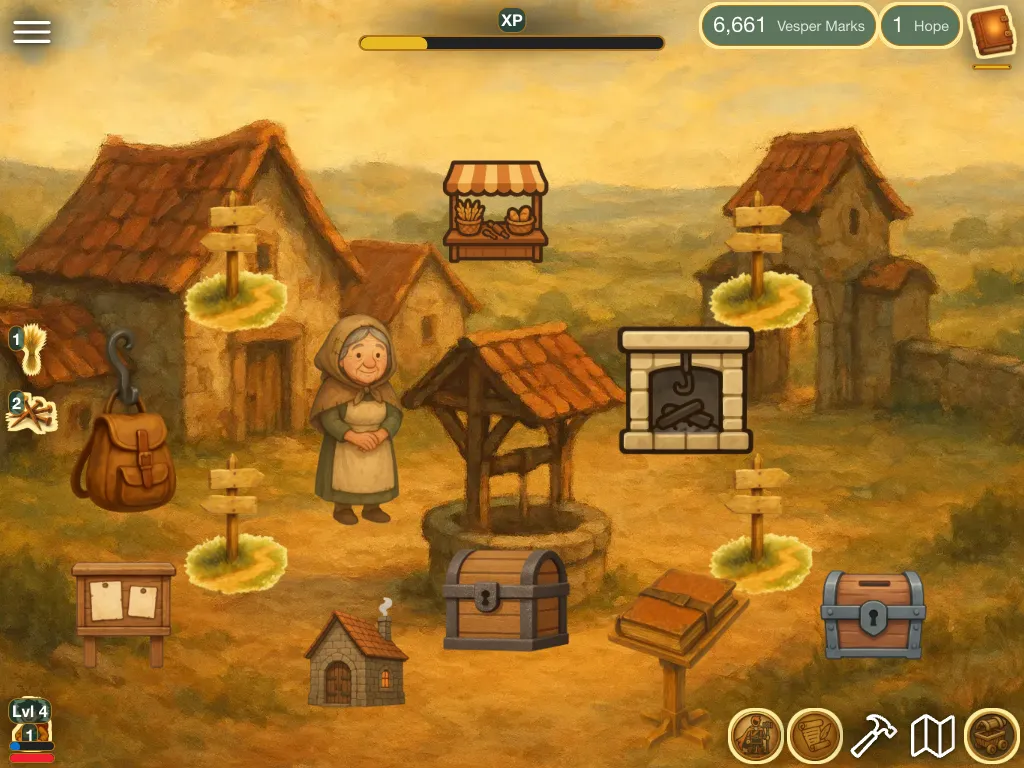
A fine world deserves fine clothes. The Tailor will measure your screens.
The Tailor's Tent covers how your game looks on screen: the on-screen counters and buttons (the HUD), and the styling of the game's screens.
How it connects
The counters and buttons you place here are components from the Forge, so each one shows or opens something you already made. One HUD serves the whole game: it sits over every scene you build in the Atlas.
Guides
Ideas & systems
- How the game screen is put together The scene, the HUD and the menu panels that make up what a player sees, and where each one is set up.
- The HUD The counters and buttons fixed around the edges of the game screen, and how you place them.
- Colours and shapes How one theme of colours, borders and corners paints every panel, card and button in a game.
- Which menus the player sees The switches that show or hide each tab of the Shop, Backpack and Journal panels.
- The property window The Edit Mode window where you give a component stats and buffs, and set the rules of its actions.
Reference
- Game menu button The HUD button that opens the game's own menu: volume, text size, leaving the game and Edit Mode.
- Counter for something the player holds A HUD counter that shows the player's picture and number for one component they own, with an optional bar.
- Labelled player counter A HUD counter that shows the player's number for one component as text with a label, and no picture.
- Counter for something in the place A HUD counter that shows the picture and number for one component the current place holds, with an optional bar.
- Labelled place counter A HUD counter that shows, as text with a label, how many of one component the current place holds.
- Backpack button A HUD button that opens the player's Backpack panel on its Inventory tab.
- Crafting button A HUD button that opens the player's Backpack panel on its Crafting tab.
- Map button A HUD button that opens the map, where the player picks a place to travel to.
- Shop button A HUD button that opens the Shop panel, with its Build, Buy and Sell tabs.
- Journal button A HUD button that opens the Journal: quests, research, achievements, collection and story.
- Team button A HUD button that opens the team panel, where the player hires and fires characters.
- End turn button A HUD button that ends the player's turn in a turn-based game.
- Player portrait The player's portrait on the HUD, with a level badge and bars for experience and health.
- HUD anchors The eight places on the game screen where HUD buttons and counters are pinned, and what Vespera keeps in each.
- Theme colours Every colour, border and corner setting in a game's theme, grouped by what it paints, with the editor's default for each.
- How menus open Which HUD button and which scene button open each panel, and what each way does and does not skip.
- Menu button A button you place in a scene that opens one of the game's panels when the player presses Open.