Reference
Menu button
Not every door hangs on the frame of the screen. Some stand in the room, with a table or a hook for a handle.
What it is
A Menu button is an object you place in a scene. When the player taps it, a small popup shows its name and an Open button. Pressing Open opens one panel of the game. You choose the panel when you create the button.
A panel is a window such as the Shop, the Journal or the Backpack. A Menu button is the scene's way in. A HUD button is the screen edge's way in, and it is always there. A Menu button is only where you put it, so it can sit behind a requirement.
Settings
| Setting | What it means | Example |
|---|---|---|
| Which menu it opens | The panel it opens. The choices are Shop, Travel, Journal, Backpack, Player and Crafting. | Crafting |
| Name and description | What the popup shows above Open. | The Smith's Table |
| Picture | The object's art in the scene. | A forge table |
| Requirements | Optional. Give the button an Open action to check requirements or costs first. | None |
The six choices open these panels.
| Choice | Opens |
|---|---|
| Shop | The Shop, with its tabs Build, Buy and Sell |
| Travel | The world map |
| Journal | The Journal |
| Backpack | The Backpack, on Inventory |
| Player | The Backpack, on Stats |
| Crafting | The Backpack, on Crafting |
Setting it up
- Play your game, open the game menu and click Edit this Game.
- In the Add Components panel, click + Create Component and choose Menu button.
- Under Which menu it opens, choose a tab. The tabs are SHOP, TRAVEL, JOURNAL, BACKPACK, PLAYER and CRAFTING.
- Give the button a name and a description, and add a picture. The form offers Choose image and a way to describe one instead.
- In Add Components, type the button's name in the search box and drag its tile onto open ground in the scene. If a Heads up box appears, click CONTINUE.
Make a shop walks the same steps for the Shop choice, with pictures of the form.
In Vespera
In Vespera: The Smith's Table Play it
The Smith's Table stands in the Silent Forge. Tapping it shows a dark popup that reads "The Smith's Table" and "Where the Guild lays out its plans. Known recipes can be worked here." Pressing Open opens the crafting panel.
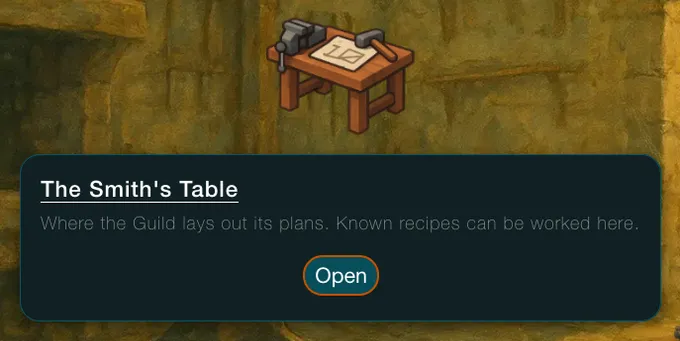
Vespera has more of these. Maren's Stall is a Menu button for the Shop. Its popup reads "Maren's trading counter. Marks for goods, goods for Marks." and Open shows the tabs Build, Buy and Sell. The Quest Board opens the Journal. The Pack Hook, by the door, opens the Backpack on Inventory. Its popup reads "A hook by the door for the traveller's pack." The design also has a Map stone behind a requirement and a still pool in the Bards' Ruin that opens Frono's stats. Neither is shown on this page.
Good to know
- A scene button is only where you put it. A player who has not been to the place cannot press it. For a panel that must always be at hand, use a HUD button.
- Gate it with an Open action. A button that opens at once has no requirements. Add an Open action when you want one.
- A switched-off tab stays off. A Menu button cannot show a tab that the game's menu switches hide.
Under the hood
- Without an action of its own, a Menu button opens its panel at once when the player presses Open. If you give it an Open action with requirements or costs, they are checked first. Do not add an Open action only to make it clickable. A real one is a second answer to what pressing it does.
- Edit Mode makes a Menu button a fixture: there is only one of it per spot, and the player cannot drag it around.
- A Menu button can go in a scene. It cannot go in a backpack, a container, a shop or the Build menu.