Ideas & systems
Which menus the player sees
Every panel is a cabinet of tabs. The Tailor decides which drawers the player may open.
What it is
Three panels are made of tabs: the Shop, the Backpack and the Journal. A game can switch each tab on or off. A tab that is off does not show, and the player never sees it.
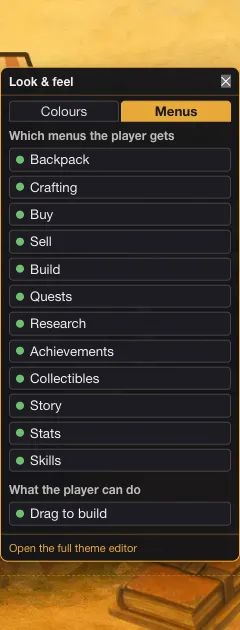
The switches sit on the Menus tab of the Look & feel panel in Edit Mode. The panel has two headings.
- Which menus the player gets has twelve switches, one per tab. Each row shows a dot, green when the tab is on.
- What the player can do has one switch, Drag to build.
| Panel | Switches | Tabs the player sees |
|---|---|---|
| Shop | Buy, Sell, Build | Buy, Sell and Build |
| Backpack | Backpack, Crafting, Skills, Stats | Inventory, Crafting, Skills and Stats |
| Journal | Quests, Research, Achievements, Collectibles, Story | Quests, Research, Achievements, Collection and Story |
Two rows are named differently from their tab. The switch Backpack controls the Inventory tab, and Collectibles controls the Collection tab.
How it works
- Open the HUD surface in Edit Mode. Choose Edit this Game, then HUD.
- Open Look & feel and choose Menus. The button with the title Look & feel is in the Add to the screen panel.
- Click a row. It turns the tab on or off. The change is one step you can Undo.
- Read the result in play. Each panel shows only the tabs that are on. The Shop opens on Build if it has items to build, then on Buy, then on Sell.
Drag to build is not a tab. When it is on, a player can drag an item from the Build tab onto the scene to build it where it is dropped. When it is off, the cards only click. The item then lands unplaced, and a placement zone that matches it claims it. Use it off for games whose components belong in placement zones.
Some panels have no switches. The map and the character roster always show their whole panel when opened.
In Vespera
In Vespera: All twelve on Play it
Vespera leaves all twelve switches on. That is Vespera's choice. Nothing is hidden, and the three panels show every tab: Build, Buy and Sell in the Shop; Inventory, Crafting, Skills and Stats in the Backpack; Quests, Research, Achievements, Collection and Story in the Journal.
Crafting stays shown from the first minute. A new player who opens it before finding any recipe sees an empty tab that says "You have no crafting recipes. When you find them, they are added and can be crafted from here."
Good to know
- Hiding a whole panel's tabs leaves an empty panel. Keep at least one tab on in each panel.
- Crafting here is a Backpack tab. It is a separate switch from the Shop's Build tab.
- Switches are for the whole game. You cannot hide a tab for one place or one player.
Under the hood
- A switch that is missing from a game's settings counts as on. Only an explicit off hides a tab. A game saved with no menu settings at all shows every tab.
- Exporting a game and importing it again keeps the tabs the game played with.
- The corner stacking switches of the HUD are stored beside these, but they are set from each corner, not from the Menus tab.
- Whether a game has quests, recipes and so on follows from the components it contains. Those facts do not hide a tab. Only these switches do.
- If every tab of a panel is switched off, the panel still opens but it is empty.
- When a HUD button asks for a tab that is switched off, for example Crafting, the panel opens on another tab that is on.
- Each change rewrites the whole set of switches as one undoable step, so one change cannot lose another.