Your first quest
Every Maker's first page in the Ledger is a walk. You play the little game, and then you open it up and see the gears.
The quest
By the end you have played the first quest of the example game, Vespera: you have travelled between three places, harvested wheat, made nails, completed a quest and chosen a path for your hero. Then you have looked, in Edit Mode, at the pieces that made it happen. You touch all three realms in one small game.
The first half is play only. It takes about 10 minutes, and some of that is waiting for timers. The second half is a look inside; you change nothing.
You'll need
-
For steps 1 to 7, only a browser. For steps 8 to 12, an email address you can read, to make your own copy of Vespera. See How a new game starts for what happens when a game begins.
-
About 10 minutes for the play, uninterrupted.
-
The game itself, which plays in your browser: Play it.
-
For steps 8 to 12, your own copy of Vespera. Making one takes about two minutes:
- Open Vespera's game page (the same page as Play it) and click Make your own copy. In the game, the game menu has the same item.
- Enter your email and click Create My Game.
- Open the email, find the code, type it in the Code field and click Verify. The code works for 15 minutes; Resend code sends a new one.
- Wait about two minutes while the game is copied ("Copying the game... this can take a couple of minutes."). The copy then opens in Edit Mode.
The copy is private to you. It starts without Vespera's design cards, and your progress in Vespera does not carry over. If your email already has an account, choose Email me a sign-in link, sign in, then open the game again and choose Make your own copy.
Steps
Steps 1 to 7 are play. Steps 8 to 12 are a look inside.
- Open Vespera's game page with Play it (or, once signed in, click Start New Game on Home and pick the Vespera tile). Click Start Playing (it reads Start New Game if you already have a game of Vespera). No account is needed to play. Make your own copy sits beside it, and you will use that later. The Intro plays by itself for about a minute. See How a new game starts.
- At the Last Outpost, tap Old Maren and choose Welcome. A short story plays, with three captions; click Continue after each. When it ends, a toast says "You have received a new quest"; click DISMISS so it does not cover the top of the screen. See NPC and Create a quest.
- Tap the signpost at the upper left of the Outpost. Its box reads "Path to the Withered Fields". Choose Travel. See Paths and travel.
- In the Withered Fields, harvest the Surviving Wheat three times; each harvest takes 7 seconds. The sheaves land in Unplaced Items: tap the pile, press + until it shows 3 (a short pause between presses), then choose Pickup. Two counters appear on the screen, for Wheat Sheaf and Vesper Marks. See Harvest and Harvestable and Scenery.
- Travel back to the Outpost by the signpost at the lower left of the Fields. Then tap the signpost at the upper right of the Outpost, "Path to the Silent Forge", and choose Travel again.
- Tap the Tinker's Bench at the lower right of the Forge (not the Smith's Table at the top) and choose Make nails. Each run uses one Scrap Iron from the pile beside the bench and makes 2 nails. Do it three times; each takes 10 seconds. Pick the nails up from Unplaced Items the same way. An Iron Nails counter appears. See Structure and Make things.
- Travel back to the Outpost. Tap The Quest Board, the notice board at the lower left, and click Open. On the Quests tab, find First Light and click Complete. Then close the Journal: the next story has already started behind it. The Hearth Wakes plays, with three captions; click Continue after each. Dismiss the new quest toast, then answer "What kind of Restorer will you be, Frono?" with Trader. See Create a quest and Play story.
- Now the look inside, in your copy. If your copy is not already open in Edit Mode, open the game menu and click Edit this Game; it shows only in a game you own, so you will not see it in Vespera itself. Edit Mode opens with Add Components on the left; on a window narrower than about 1,000 pixels the panel sits along the bottom. To leave Edit Mode later, click the × (Exit edit mode) at the right end of its top bar. You will not need to travel: Add Components lists the components of every place. See Add components to a scene.
- In the search box, Search…, type "Surviving Wheat". Hover over its tile and click the pencil that appears. The property window opens. Its Harvest action gives the Wheat Sheaf you carried. See Harvest and Gives.
- Close that window, search for "Tinker's Bench" and open it the same way. Its actions include Make nails, the one you ran three times. See Structure and Build an idle machine.
- In the bar at the top, pick HUD. On a narrow window it is an icon only, the second icon in the bar. The panel Add to the screen lists the buttons and counters; the counters you watched appear are placed here. See The HUD and Move the HUD buttons.
- To see The Hearth Wakes itself, open your copy, Vespera: The Great Restoration (Copy), in the admin pages. Open the game menu and click Exit Game, go to Home and click My Games Dashboard, then click your organisation. Under Your Games click your copy, then Story Sequences in the left bar, then the story's name. The left bar shows only on a window about 1,000 pixels wide or wider; on a narrower one, widen the window. Look, do not save. See Story sequences and Make a one-line story.
Close the Journal after Complete
When you complete a quest, the next story starts at once, behind the open Journal. Close the Journal to see it and click Continue. The quest toast, "You have received a new quest", also stays over the top of the screen and covers the top buttons. Tap the things below it.
Try it
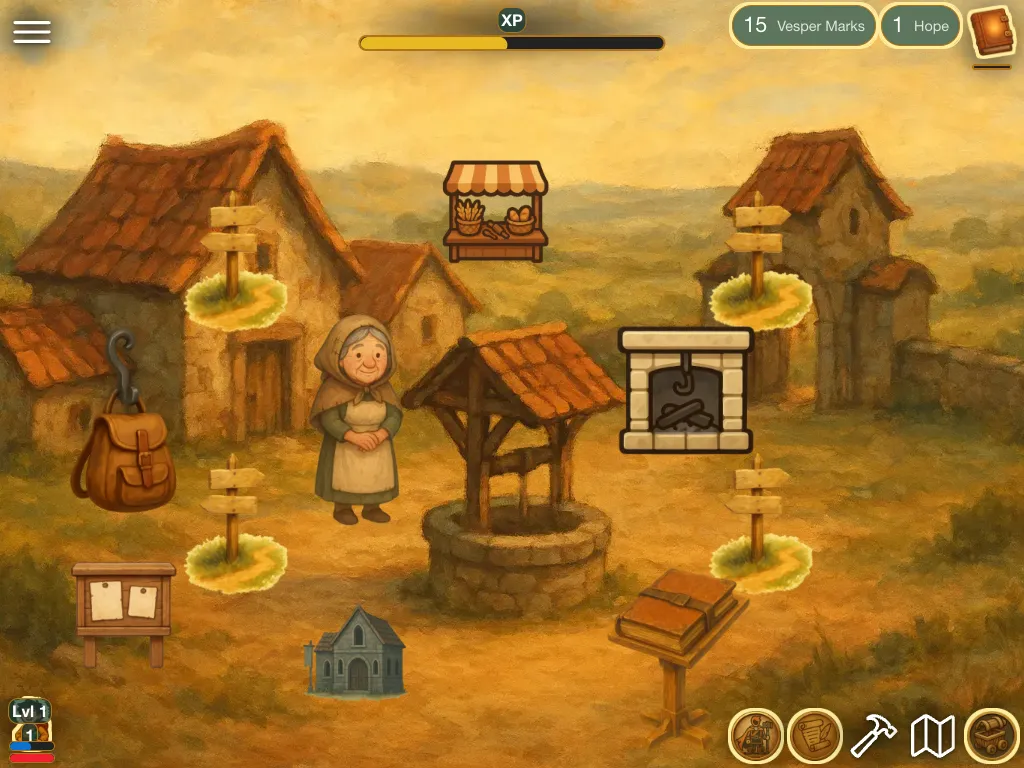
Back in play, look at the screen. You have Hope 1 and 15 Vesper Marks, the Wheat Sheaf and Iron Nails counters are gone because First Light used them up, and a new quest, Tools for the Fields, waits in the Journal (the button with the red badge, bottom right). That is the whole loop: places, a harvest, a made thing, a quest and a story.
Going further
- Build a quest of your own. See Create a quest.
- Put something new in a place. See Add components to a scene.
- Look up a word you met. See the Glossary.