Build an idle machine
The best machine is one that works while the Maker is away. Here is how to let players build one, and how to leave it grinding.
The quest
By the end, The Mill is on the Build Menu. A player pays 4 Timber and 8 Iron Nails, waits 20 seconds, and the Mill stands in the Fields. Once it stands, its Grind action runs again and again without a tap, until it runs out of wheat.
You'll need
- A game you can edit.
- A Structure that already makes things. Here it is The Mill, with its Grind action. See Structure and Make things.
- The components the build will cost, here Timber and Iron Nails.
- Optional: an empty slot where the Mill will land. See Give a place its starting items.
Steps
-
Play your game, open the game menu and click Edit this Game.
-
In Search components..., type "The Mill".
-
Drag The Mill from Add Components onto the Build Menu panel in the dock. A message reads "The Mill is now buildable. Set what it costs below - undo removes it from the Build Menu." The counter on the panel goes up by one.
-
Click the pencil on The Mill's tile in the palette. The property window opens, titled "The Mill" with "Identity, actions & settings" under it.
-
Under Build, the Cost reads "No cost - the player can build this for free." Click ADD.
-
In Choose a component, pick Timber and set Quantity to 4. Click ADD again, pick Iron Nails and set Quantity to 8.
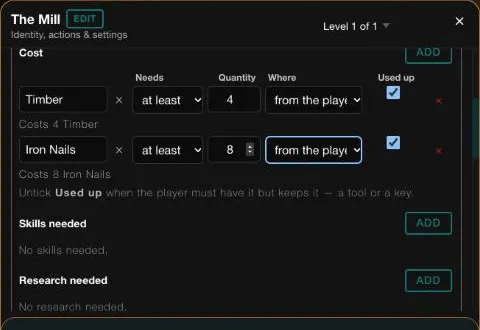
The Cost of the Mill: 4 Timber and 8 Iron Nails, both used up, taken from the bag. -
Keep Used up ticked on both rows and Where set to the player's bag.
-
Scroll down to How long it takes (seconds) and type 20.
-
Click ADD PLAYER EFFECT. In Pick a stat or capability., choose XP, click ADD, type 10 and press Tab. The line reads "The character running this action has XP increased by 10."
-
Scroll to the bottom of the card and click SAVE. If a Heads up box asks, click CONTINUE.
-
In the window, open the machine's own action, here Grind. Under Settings, check that Start the next round by itself when it can is ticked.
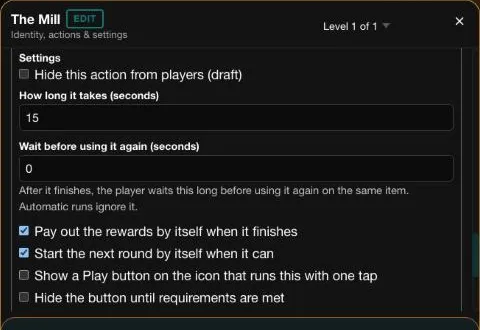
Grind runs for 15 seconds a round, and starts the next round by itself. -
Click ✕ ("Exit edit mode") to leave Edit Mode.
Making your own idle machine
Grind was set up with Auto Exec already ticked. On a machine of your own, tick it yourself. It needs Pay out the rewards by itself when it finishes ticked and a time above 0, or Save is refused.
Good to know
The Grind's other lines, such as the share of wheat it turns into flour, are shown as read-only lines in the window. They are set up by the assistant. See Converts a share of what went in.
Try it
Edits do not reach a running game, so start a new one. On the home page click Start New Game, pick Vespera and click START NEW GAME.
- Tap the round button at the lower left to open the Shop. Open the Build tab. It lists The Mill. Its info icon shows "Duration 20 Seconds", the cost of 8 Iron Nails and 4 Timber, and "Character Effect XP + 10".
- Press the Mill's Build button. The cost is taken at once. About 20 seconds later, the Mill stands in the Fields.
- Tap the Mill and choose Grind. You do not tap again. Each round takes 15 seconds, and the next one starts by itself.
- When the wheat runs short, the Mill stops and a Warning dialog names the Wheat Sheaf. Pick more wheat up, and the Mill starts again with no tap on it.
In the played run the Mill's first round used 6 of 12 Wheat Sheaf and gave 6 Flour. A round that took the Fields to 100 XP made the Fields level up. See Changes a place's stat.
Going further
- Add an upgrade. Make the machine better after it is built. See Upgrade.
- Know what a round does. See How an action runs.
- See the whole recipe. A machine, an income, a bar and a goal. See Idle and clicker recipes.
- Bake what it grinds. The Mill passes its Flour on to the Bakehouse Oven, which bakes it into loaves. See Handle event.