Give a place its starting items
A new game opens on a place that already has some life in it. Here is how a Maker sets it there, and saves a spot for what players will build.
The quest
By the end, the Withered Fields has a Bakehouse Oven standing in it at the start of every new game. The Mill has a place waiting for it, an empty slot, but nothing stands there until a player builds it.
You'll need
- A game you can edit.
- A location with a scene. Here it is the Withered Fields. See Location.
- Two Structures to place: the Bakehouse Oven and The Mill. See Structure.
Steps
-
Play your game and travel to the place. A new game opens with a cut-scene: tap skip at the top left. In Vespera, then tap the signpost Path to the Withered Fields in the Last Outpost and choose Travel.
-
Open the game menu and click Edit this Game.
-
In Search components..., type "Bakehouse Oven". Wait until Edit Mode has finished loading before you type.
-
Drag the Bakehouse Oven tile from Add Components onto the scene, where it should stand.
-
If a Heads up box asks whether to continue, click CONTINUE. A spinner reads "Loading start resources..." and then the oven stays in the scene.
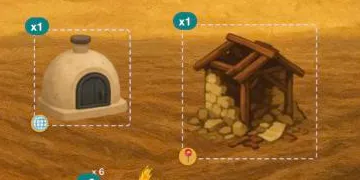
The Bakehouse Oven in the Fields, with its starting count of 1. The granary beside it was already there. -
Search for "The Mill" and drag its tile onto the scene, to the left of the oven. If the Heads up box asks again, click CONTINUE.
-
Collapse the palette with the arrow beside Add Components. The palette was covering the Mill's count badge.
-
Click the x1 badge on the Mill. A dark stepper opens with a minus, the number 1, a plus, a tick and a cross.
-
Click the minus until the number reads 0, then click the tick.
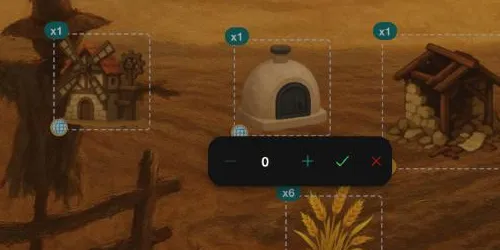
The stepper on the Mill's x1 badge, set to 0. -
If a Heads up box appears, click CONTINUE. The Mill is no longer drawn in the scene. It is now an empty slot.
-
Click ✕ ("Exit edit mode") to leave Edit Mode.
Good to know
A starting count of 0 is a slot, not a mistake. Nothing is drawn there, but the spot is kept. When the Mill is built, it takes that spot.
The level of the place
An item you drop is written for the level the place is at now. A new game starts a place at level 1, so a drop made at level 1 shows up in every new game. A drop made while the place is at level 2 appears when a player's place reaches level 2.
Try it
Edits do not reach a game that is already running, so start a new one. On the home page click Start New Game, pick the Vespera card and click START NEW GAME. Skip the cut-scene, travel to the Fields and look. The Bakehouse Oven is drawn. The Mill is not.
The Mill is not missing. Its slot is waiting. In a new game the Shop lists The Mill under its Build tab. Building it fills the slot.
Going further
- Fill the slot. Make the Mill buildable and let players put it up. See Build an idle machine.
- Keep an item at every level. A placed item carries a small button. On the Oven and the Mill its tooltip reads "Make node-only". Making an item node-only ties it to this spot of the map, so it does not depend on the level the place was at when you dropped it.
- See what a count means. Starting item lists every setting of a placement.