Action types
Build
A town is only a field until someone pays for the first wall. Build lets the players pay.
What it is
Build lets players construct a Structure or a Container themselves. They pay the cost, wait for the build time, and the new item appears in the place. It is like Buy, but the item first stands as a draft while it is being built.
What the player sees
The round button at the lower left of the game opens the shop. Its Build tab lists what can be built. Each entry shows its cost and its build time. The player presses its Build button. The cost is taken at once. When the time is up, the item stands in the place.
A Build with no drop point puts the item in the scene's Unplaced Items tray, unless the Maker set an empty spot for it. The player can also drag the item out of the Build Menu and drop it where they want it. A drop is refused when it lands off the scene, or on a spot that another item already covers.
Which components can have it
A Structure (see Structure) or a Container. Edit Mode offers Build on both.
Requirements & effects it uses
| Requirement / effect | What it does here |
|---|---|
| What it needs | The cost, taken from the player's bag by default. |
| Changes the character's stat | A stat the builder gains, such as XP. |
A Build gives the item itself, so you do not add a reward for it. Skills, research and player stats can also be required. They are listed under the hood.
Setting it up
You cannot add a Build from the create form. You make a component buildable by dropping it on the Build Menu.
- Play your game, open the game menu and choose Edit this Game.
- Drag the Structure from Add Components onto the Build Menu panel in the dock.
- Select the Structure to open its property window, and find Build.
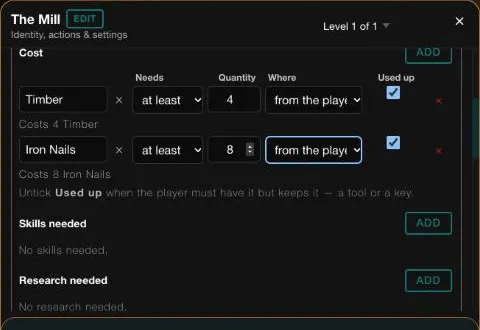
- Under Cost, click ADD. Under Choose a component, pick what it costs, and set Quantity.
- Leave Used up ticked, and leave Where on "from the player's bag".
- Repeat for each cost.
- Set How long it takes (seconds).
- Click ADD PLAYER EFFECT, then Pick a stat or capability., choose the stat and type the amount.
- Scroll to the bottom of the Build card and click Save, then CONTINUE in the Heads up dialog.
In Vespera: the Mill Play it
The Mill is built from the Build Menu. Its Build takes 20 seconds and uses up 4 Timber and 8 Iron Nails from the player's bag. When it is done, the builder gains 10 XP.
In a new game, the shop's Build tab lists The Mill. Its info card reads Duration 20 Seconds, with 8 Iron Nails and 4 Timber needed.
The Guild Coffer has an instant Build. From the Build tab of Maren's Stall it costs 12 Iron Nails, 4 Timber and 10 Vesper Marks, all used up, and gives 10 XP. It takes the empty spot at the Outpost that the Maker left for it. See Process awards.
Good to know
- Cost comes from the bag. Unlike Make things, a Build takes its cost from the player's bag by default. A cost written for the place cannot be paid from the backpack.
- One cost, two places. You can change each cost to come from the bag or from this place.
- Draft while it builds. A timed Build stands as a draft until its time is up.
- A second copy. A timed Build of a Structure that is already standing is added to it at once. If the first copy is still being built, the second one gets its own icon.
- A drop on a copy that is still being built is refused until it is built.
- Idle games. For machines that stack, an instant Build (time 0) or a Buy is easier to read.
Under the hood
- A Build is checked in this order: the player's rules first, then the cost, then the new item. When the time is up, it becomes active and its effects run.
- A Build gives its own item, so it needs no reward row for it. Any extra reward the Maker adds is also given, but the property window shows it as a read-only line.
- A cooldown stops the same item from being built again too soon. The server keeps it in memory, so it resets when the server restarts.
- A Build can also require skills, research and player stats, and the property window edits all three.
- Locked components cannot be built until they are unlocked.