Action types
Travel
A road is only a promise until someone is allowed to take it. Travel is the permission.
What it is
Travel moves the player to another place. A path in a scene is a signpost with a destination. The player presses it and arrives. A path can be free, cost something, or stay shut until the player meets a rule.
What the player sees
In a scene, the player taps a signpost and chooses Travel. If the path is free, or the player meets its rules, they arrive in the new place. If a cost cannot be paid or a rule is not met, the move does not start.
Which components can have it
A signpost, which the game calls an Exit, and a Location, entered by a map tap. You edit a signpost's Travel in the Edit Exit dialog.
Requirements & effects it uses
| Requirement / effect | What it does here |
|---|---|
| What the player needs | What the player must carry, or must have met. An item can be used up. A story is never used up. |
| Player stat requirements | A stat the player must have, such as stamina. |
| Changes the character's stat | A stat a journey costs or gives. |
Other requirements are possible, such as a skill or a research. They are listed under the hood.
Setting it up
- Play your game, open the game menu and choose Edit this Game.
- Collapse the palette with the arrow beside Add Components.
- Click the signpost in the scene. The exits are not labelled, so open each one's blue pencil until you find the right one.
- In Edit Exit, check Name and Destination.
- Under To use this Exit, the player needs, click ADD. A free path says "Free to use."
- In Choose a component, type the name and pick it. Needs sets the comparison and Quantity sets the count.
- Scroll to the bottom and click Save changes, then CONTINUE in the Heads up dialog.
In Vespera: the path to the Hollow Road Play it
In the Last Outpost, the signpost Path to the Hollow Road leads to The Hollow Road. Its row under To use this Exit, the player needs is The Smiths Return, Needs at least 1. The Smiths Return is a story, so Used up is unticked and locked, and the row reads "Needs at least 1 The Smiths Return (kept)".
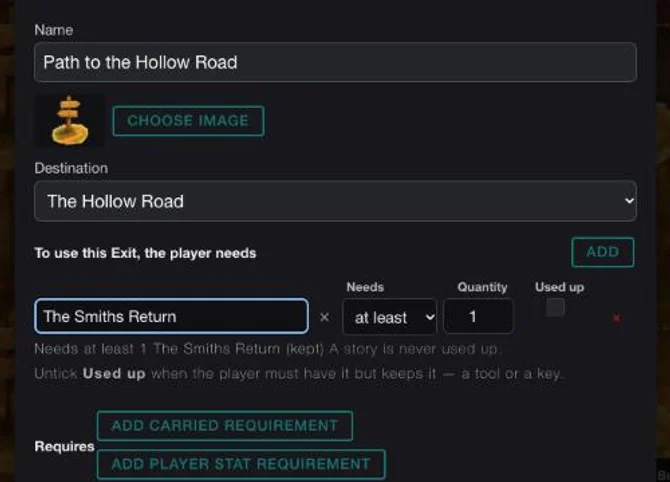
A player who has not seen the story The Smiths Return cannot take the path. One who has can take it, and keeps the story.
Good to know
- A story is never used up. Choose a story as a requirement and the game keeps it.
- Items and stats use different buttons. The top ADD is for a component the player needs, including a story. ADD CARRIED REQUIREMENT and ADD PLAYER STAT REQUIREMENT below are for stats only.
- Costs come from the bag. The dialog edits costs, keys and gates the player pays from their bag.
- Free is fine. Do not add a cost to a path that should be free.
- Research can gate a path. The Edit Exit dialog has a Research needed group beside the item rules. See Link two locations.
- The signpost itself. What a path is and how it is placed: Path. How the paths of a whole world fit together: Paths and travel.
- The exits are not labelled. Open each pencil until the name matches.
Under the hood
- Travel lives on two kinds of component: a Location, entered by tapping the map, and a navigation button, a signpost placed in a scene that has its destination built in. Edit Mode authors the signpost.
- The older way of linking places was to draw connections between map nodes. It is not the way to author travel any more. A map with no connections on the places involved lets players travel within one map.
- A tap on a signpost names its destination, but the game still checks that the move is allowed.
- When the player arrives, the game can start the new place's Open and story actions and wake any enemies there.
- A Travel can also give a reward when it finishes, such as a story. Edit Mode shows it as a read-only line.
- Costs are written for the exit's own place unless the cost is set to come from the player's bag. The Exit dialog owns the player-bag ones.