Link two locations
A path is a promise, and promises go one way. Here is how a Maker keeps the other half of it.
The quest
By the end, the Gloam Mine has a signpost called "Back up to the Road". A player who taps it and chooses Travel arrives on the Hollow Road.
You'll need
- A game you can edit, with two locations: the one the signpost stands in, and the one it leads to. See Location.
- Optional, for a gate: a Research component the player can earn. See Research.
Steps
-
Play your game and open the game menu. Click Edit this Game.
-
Go to the place where the signpost should stand. Select a signpost, click the green ↗ above it and click TRAVEL. In Vespera, take the signpost "Down into the Gloam Mine" to the Mine.
-
If the palette is collapsed, open it with the arrow beside Add Components.
-
Drag + Exit from the palette onto the scene. A plain click does nothing. The Add Exit dialog opens on EXISTING PLACE.
-
Type an Exit name, for example "Back up to the Road".
-
Under Destination, choose the place it leads to, for example "The Hollow Road".
-
Leave Requires a resource unticked for a free path.
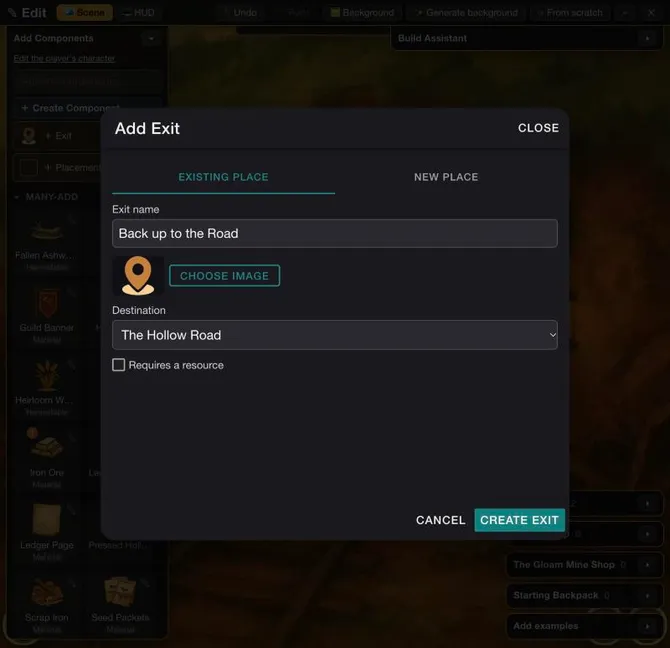
The Add Exit dialog on EXISTING PLACE. -
Click CREATE EXIT. It reads "Creating..." for several seconds.
-
The Exit created dialog says "The Exit is ready. You can make small changes here or open a full editor." Under To use this Exit, the player needs it reads "Free to use." Click CLOSE.
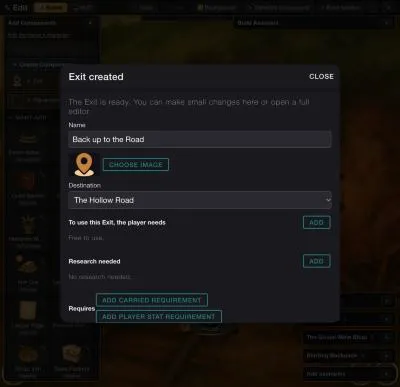
The Exit created dialog. -
Drag the new signpost to where it should stand. If a Heads up box asks whether to continue, click CONTINUE.
-
If the path should be gated, select the signpost and click its blue pencil to open Edit Exit. Under Research needed, click ADD. In Choose a component, type part of the name, such as "Wayfinder", and pick Wayfinder's Lore. The row reads "The player has researched Wayfinder's Lore".
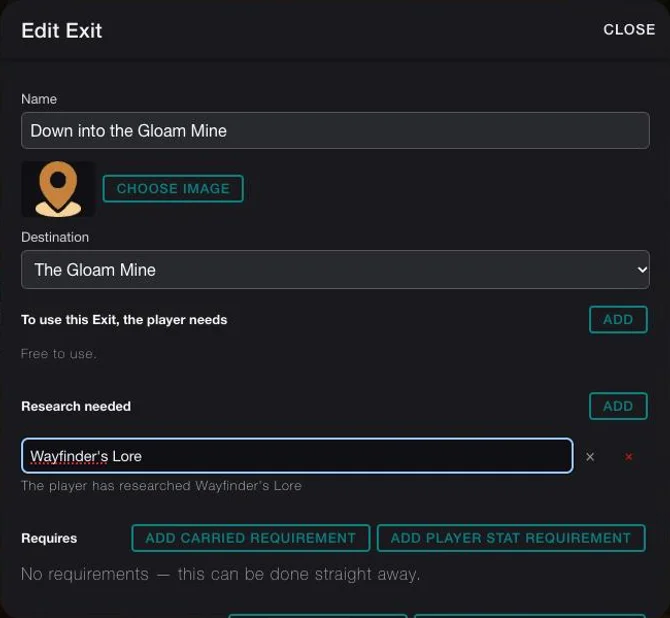
An exit gated by research. This is the Down path, not the way back. -
For the gate, scroll to the bottom and click SAVE CHANGES. A message reads "Exit updated." Click ✕ ("Exit edit mode") to leave Edit Mode.
Research needed is for research
The top ADD, under To use this Exit, the player needs, picks items and stories, not a Research. A Research goes under Research needed. It is kept, not used up.
Good to know
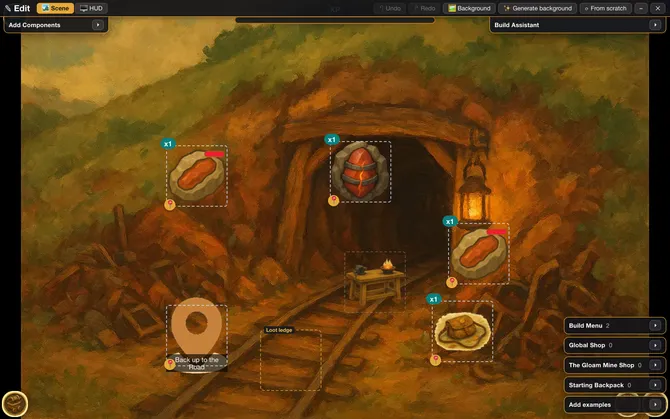
In a narrow window part of the scene is out of view, and the game's own buttons cover its left edge. A signpost placed right at the edge can end up half hidden, as in the picture at the top, which shows the first try. It is still there. Vespera's "Back up to the Road" was later placed further in, so it can be seen and tapped.
Try it
Start a new game: on the home page click Start New Game, pick the Vespera card and click START NEW GAME. Skip the cut-scene and play to the Hollow Road. Tap the signpost "Down into the Gloam Mine" and choose Travel. Without Wayfinder's Lore, an alert reads "Requirements Not Met / You do not have the required resources to do this. / 1 Wayfinder's Lore". With it, the Mine loads. Tap "Back up to the Road" and choose Travel, and you are on the Road again.
In Edit Mode, the green ↗ checks where a path leads, and skips its rules. Test a gate in play. See Paths and travel.
Going further
- Gate the way in. Gate a path behind a story or a research, as the Down path is. See Paths and travel.
- Make the place first. If the destination does not exist yet, make it with a new place. See Make a new location with scene art.
- Know the signpost. See every setting of a path in Path.
- See the whole world. For how maps, places and paths fit together, see How a world fits together.