Reference
Path
A road is only a promise until someone puts up a sign. A path is the sign.
What it is
A path is a signpost you place in a scene. When a player taps it and chooses Travel, they arrive at another location. A path has a name, a picture and a destination. It can be free, or it can ask for something first. See Travel.
A path is a component, but it is not made from Create Component. It is made by the world builder, or by the assistant, when two places are linked. It then stands in the scene as a placed item. Its position is a starting item. See Starting item.
Settings
| Setting | What it means | Example |
|---|---|---|
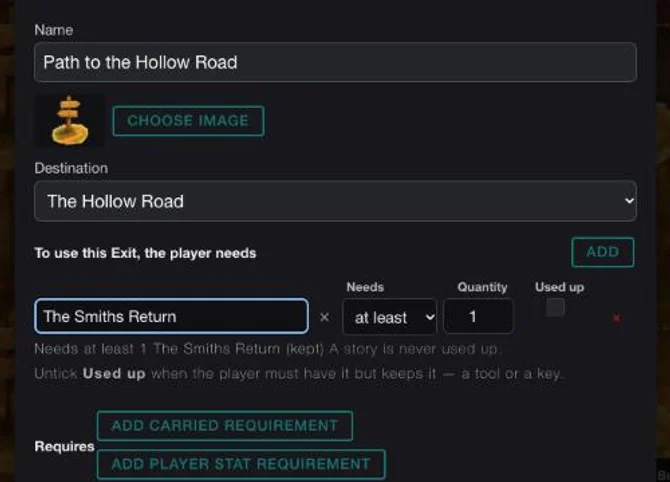
| Name | What the signpost is called. | Path to the Hollow Road |
| Picture | The signpost's art. | A wooden signpost |
| Destination | The location it leads to. | The Hollow Road |
| What the player needs | Things the player must carry or have met. | The Smiths Return, at least 1 |
| Requirements and effects | Stat requirements and stat changes a journey brings. | None on this path |
| Position | Where the signpost stands in the scene. | At the lower left of the Outpost |
Setting it up
- Play your game, open the game menu and choose Edit this Game.
- Collapse the palette with the arrow beside Add Components.
- Click a signpost in the scene, then its blue pencil to open Edit Exit. The signposts are not labelled, so open each one until the name matches.
- Check Name and Destination.
- Under To use this Exit, the player needs, click ADD to add a gate. A free path says "Free to use."
- Click Save changes, then CONTINUE in the Heads up dialog.
The full steps for adding a gate are on Travel.
In Vespera
In Vespera: the gated path to the Hollow Road Play it
In the Last Outpost, the signpost Path to the Hollow Road leads to The Hollow Road. It stands at the lower left of the scene. Its one gate is the story The Smiths Return, at least 1. A story is never used up, so the player keeps it after they pass.
In play, a player who tapped the signpost and chose Travel before they had the story saw "Requirements Not Met / You do not have the required resources to do this. / 1 The Smiths Return". They stayed in the Outpost. After the Guild of Smiths & Growers quest was turned in, which gave them the story, the same tap loaded the Hollow Road. A tap on "Back to the Last Outpost" there took them home. See Quests and achievements.
Good to know
- Stats and items use different buttons. The top ADD is for a component or story. ADD CARRIED REQUIREMENT and ADD PLAYER STAT REQUIREMENT are for stats.
- A path and its placement are one. Remove the signpost and the path goes with it. Undo brings it back.
- A path is one-way. The way back is a separate path in the other scene, such as "Back to the Last Outpost". See Link two locations.
- Free means no gate. Do not add a gate to a path that should be free.
Under the hood
- The game calls a path a navigation button, or an Exit in the dialog. It is a component of its own, with a destination built into its Travel action.
- A path is made together with exactly one placement in a scene. The two live and die together. Deleting the placement deletes the path, and restoring it brings the path back.
- A placement cannot change location. To move a path to another place, make a new one there, then delete the old one.
- A path belongs to one place. To reuse a path in a second scene, make another one.
- Edit Mode can travel through a path to check where it leads. This skips the path's cost and its requirements. Test those in play.
- A double-tap on a path in play runs its Travel straight away, if it has exactly one. With none, or several, a double-tap opens its details.
- An older way to link places was to draw connections between map nodes. Paths are replacing it.