Reference
The scene model
Every stage in the Ledger is measured the same way. Learn the ruler once and every scene falls into line.
What it is
A scene is the picture a player stands in, with items placed on it. There is one way to build a scene. Each item has a position in pixels, an x and a y, on a stage the size of the game's screen. A placement zone can lay out items that have no position.
The scene's size is the same for every place in a game. It comes from the game's screen size, not from the picture behind the scene.
A scene is drawn like this:
- The background covers the scene. It is centred. A picture of a different shape is cropped, never stretched.
- The view fits the screen's height. The player sees the whole height of the scene. The scale is the screen height divided by the scene height.
- A wide scene pans sideways. A scene wider than the screen scrolls left and right. It does not scroll up or down.
- A narrow scene gets black bars. A scene narrower than the screen leaves black bars at the sides.
- Zoom. The player can zoom in to a scale of 3, and never out beyond the fit.
- Items keep their place. Fitting the view never moves an item relative to the scene.
Settings
| Setting | What it means | Example |
|---|---|---|
| Scene size | The width and height of every scene. It is the game's screen size. | 1536 by 1024 |
| Background | The picture behind the scene. It fills the scene and is never stretched. | The Mine's painted tunnel |
| Item position | The x and y of an item's centre. Both must be above 0 to count. | x 430, y 820 |
| Item scale | How big the item is drawn. | Not set in this example |
| Tile size | The size of one item. It is also the default gap for placement zones. | 150 |
| Placement zones | Rules that lay out items with no position. None by default. | One, the Loot ledge |
Setting it up
There is no scene setting to fill in. The size comes from the game, the background is the one you give the place, and each item gets its position when you place it. Place items by following Add components to a scene, set a starting count with Give a place its starting items, and lay out loose items with a zone as in Placing things in a scene.
In Vespera
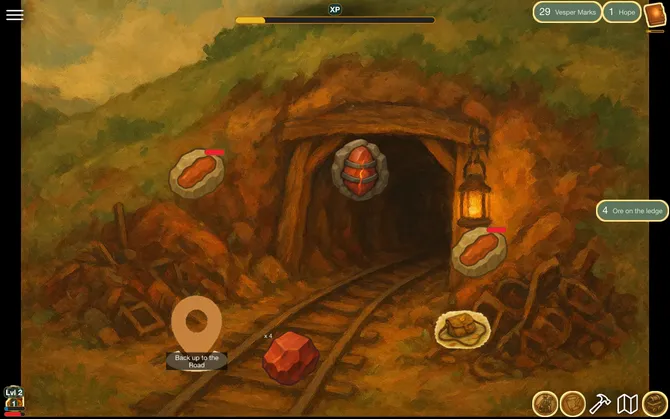
In Vespera: the Mine scene Play it
Every scene in Vespera is 1536 by 1024, the game's screen size. The Gloam Mine's background is a painted tunnel with a lantern and rail tracks.
The Mine's items are placed by position: the way back up at x 430, y 820, the two goblins at x 560, y 640 and x 760, y 600, the Sealed Seam at x 830, y 420, and the ore veins at x 430, y 430 and x 1120, y 620. One placement zone, the Loot ledge, lays out unplaced Material at an anchor of x 660, y 880.
In a play view 899 pixels high, the scene was drawn at a scale of 0.878, so it measured about 1348 pixels across. The view was 870 pixels wide, so the sides of the scene were cut off, and the player could pan to see them. The ore tile on the ledge was centred on x 660, y 880, the zone's anchor.
Good to know
- Scenes share one size. You cannot make one place wider than another. The size is the game's screen size.
- Positions are in scene pixels. They are not map pixels. A map node's position is on the map picture, and is a separate thing.
- A position of 0 is not on the scene. Use a number above 0 on both axes.
- Test on a real screen. The player's screen may show less than the whole width of the scene.
Under the hood
- Older versions offered other ways to lay out a scene. They are gone. An old exported game can still carry their settings, and the game ignores them.
- The scene's size is the game's screen size, not a setting of the place or of its background picture. The editors never measure the picture. A game with no size set reads as 1200 by 800.
- Some scene settings are stored on the place and shared by every node that shows it, so a change reaches them all. Items set for one node only are edited on that node.
- The scene is drawn the same way in the game, in the preview page and in the pictures the agent makes.