Ideas & systems
Placing things in a scene
A scene is a stage with no marks on the floor. The Ledger lets a Maker chalk a spot, or chalk a line and let the cast fall into it.
What it is
Every item in a scene needs a spot. There are two ways to give it one. You can give it a position, an x and a y on the scene, and it stands there. Or you can lay down a placement zone, which says "unplaced items of this kind go here, in a row". The zone works out the spots for you.
An item that has neither a position nor a zone to claim it is listed in the Unplaced Items tray instead. The player can drag it onto the scene.
How it works
- A position wins. If an item has a real position, it is drawn there. A zone is not asked.
- Otherwise a zone may claim it. The game goes through the zones in order and takes the first one whose match fits. An item claimed by a zone cannot be dragged in Edit Mode.
- Otherwise it goes to the tray.
A zone matches on the component type, a placement class, or both. A zone with no match at all matches everything, so it must be last.
To make a zone in Edit Mode:
- Open the palette's Add Components section and find + Placement Zone below + Exit.
- Drag it onto the scene. Where you drop it is the zone's anchor.
- In the dialog Add Placement Zone, type a Name, and pick a component type in the first drop-down and, if you want, a Placement class.
- Choose a Direction with the arrows, and choose ANCHOR IS THE FIRST ITEM or ANCHOR IS THE CENTRE.
- Click Advanced to set the Gap between items, a Wrap and a Span.
- Click CREATE PLACEMENT ZONE. If a Heads up box appears, click CONTINUE.
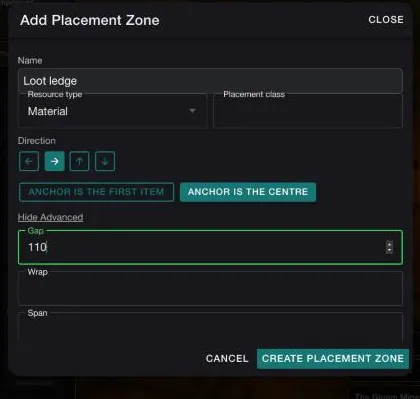
The zone appears as a dashed outline with its name. Items in a zone are spaced by the gap along the direction. With ANCHOR IS THE CENTRE, the anchor stays in the middle of the row as items come and go. With ANCHOR IS THE FIRST ITEM, the first item stands on the anchor and the rest follow it.
In Vespera
In Vespera: the loot ledge in the Gloam Mine Play it
The Gloam Mine has one zone, called Loot ledge. It matches the type Material. Its direction is right, its anchor is the centre of the row, and its gap is 110. It was dropped on the rails at lower left, and its anchor sits at x 660, y 880.
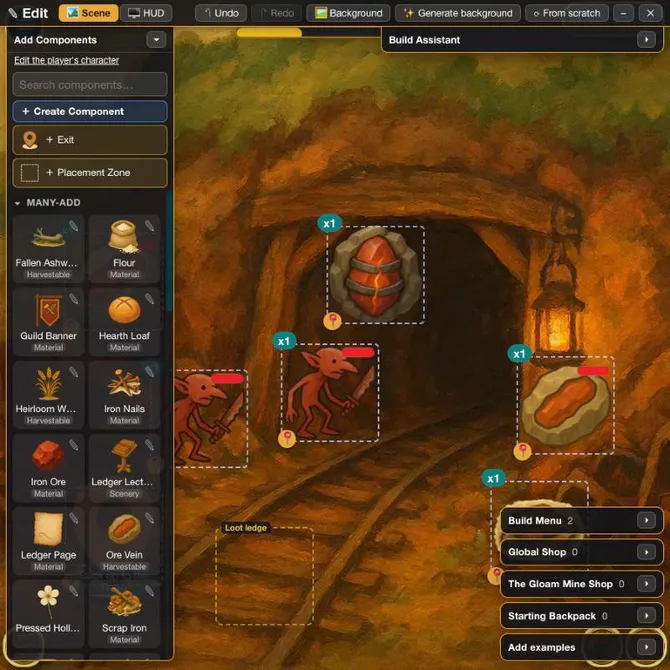
Iron Ore is a Material, and a goblin's loot arrives with no position. So the zone claims it. After the goblins were beaten, a stack of Iron Ore lay on the ledge, and its tile was centred on x 660, y 880, the zone's anchor. The picture shows the ledge later, with 5 ore.
Other places use the same two ways. The Last Outpost's Ledger Lectern stands at x 990, y 881, a position of its own. The Withered Fields has an empty slot for The Mill, a starting item with a count of 0 and a position of x 461, y 389. Building the Mill fills it. See Give a place its starting items.
Good to know
- A zone does not move what has a position. Adding a zone to a place never moves anything already drawn.
- Pin an item out of a zone. Give it a position and it leaves the row, and the others close up.
- Match on the type or the class. Here the Loot ledge claims every unplaced Material in the Mine, not only ore.
- Edits shared by every node. A zone belongs to the place. A change made in Edit Mode reaches every node that shows it.
Under the hood
- A position of 0 is not a position. An item at 0 and 0 is not drawn there. It is not drawn at all, and it goes to the Unplaced Items tray. A position needs both numbers above 0.
- A zone's positions are worked out each time the scene draws, and are never saved. That is why the others close up when one item leaves.
- A zone has no box of its own. Its footprint comes from the items in it, so the editor draws slots, not a rectangle.
- A zone that is not valid is dropped and the rest are kept. The zone panel in the admin marks it as dropped in play until it is fixed.
- The Build button sends no position, so a zone claims what it makes. Building by dragging a product onto the scene pins it at the drop point, even inside a zone.