Plan with design cards
A plan is a promise to your future self. Here you write one down, and check it against the world.
The quest
By the end, your game has a new economy card, "Iron and nails", and you have asked the Build Assistant what is left to build for it. You read its proposal, then reject it with a reason.
You'll need
- A game with a few design cards. See Design cards.
- Edit Mode, with the Build Assistant available.
Steps
- In the admin pages, click Design/Plan in the left bar. The page Design Cards opens.
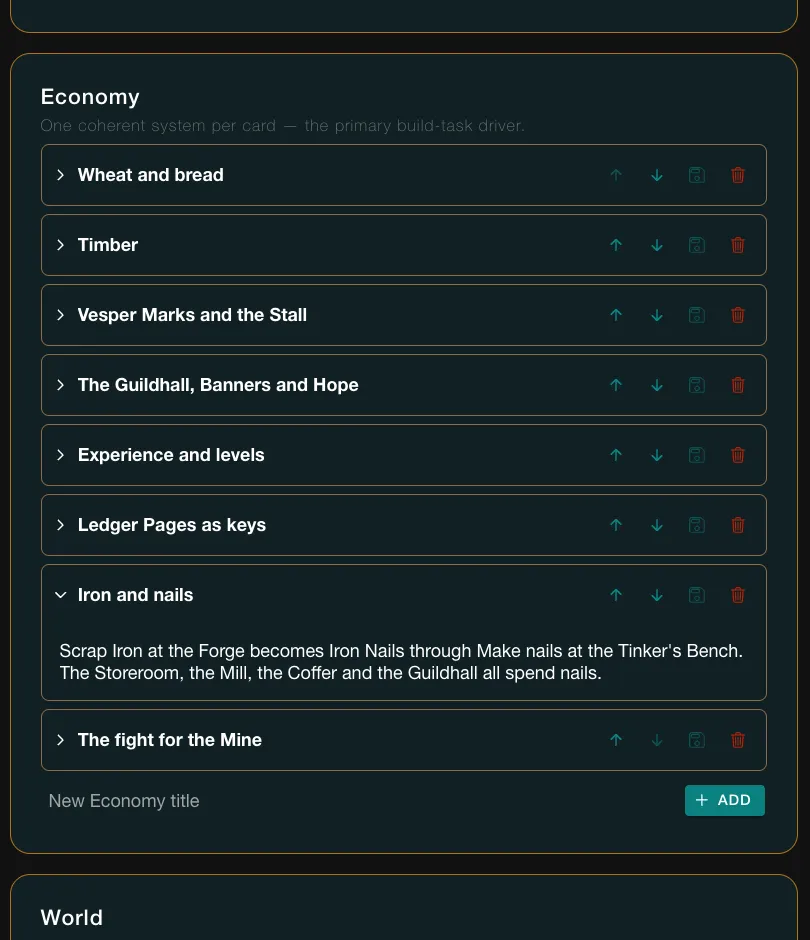
- In the Economy group, click the box New Economy title. Type a title, here "Iron and nails", and press Enter. Or click + ADD.
- The card appears at the end of the group, open. It may sit below the fold, so scroll down to it.
- Click the card's body and type what the system is. Here: Scrap Iron at the Forge becomes Iron Nails through Make nails at the Tinker's Bench. The Storeroom, the Mill, the Coffer and the Guildhall all spend nails.
- Wait a few seconds. There is no save button. The body saves by itself.
- To move the card within its group, click Move up on it. The group's order is renumbered.
- Open your game and enter Edit Mode: open the game menu and click Edit this Game. Click Open Build Assistant to open its panel.
- Type your question and press Enter: "What is left to build for the Iron and nails card?" The reply takes about 40 seconds.
- Read the Proposal card. In Vespera it proposed one task, "Build the Forge's Scrap Iron supply", from the card. It offers Approve, Continue refining and Reject. Under it the panel says "A proposal is awaiting your decision before you can continue."
- Check the proposal against what your game already holds. Here the Forge already has Scrap Iron lying on the floor, so a task to build its supply is not needed.
- Click Reject. A field asks Why? and needs an answer. Type a reason and click Confirm reject.
- The card now reads Rejected, and you can type again.
Read the plan, not only the card
The assistant plans from what the cards say. A card that says "Scrap Iron at the Forge" without naming where it comes from can lead it to plan something that already exists. Say where things come from.
Approve acts on your game
Approve accepts the proposal. Press it only when the plan fits what you want.
Try it
Go back to Design Cards and open "Iron and nails". Its text is as you typed it. A rejected proposal made no change to the game. Ask again, or press Continue refining on a later proposal to adjust it.
Going further
- Write a beat. In a Narrative arc, use its New beat title box. See Design cards.
- Plan a shop. Describe prices and stock on an Economy card. See Shops.
- Plan the screen. Describe the HUD on a World or Pillars card. See The HUD.