Make a shop
A Maker who wants Marks to change hands needs a counter. Here is how to set one down and fill its shelf.
The quest
By the end, a shop counter called Maren's Stall stands in your scene. Tapping it opens a shop whose Buy tab lists the items you stocked, each with a price in Vesper Marks. In Vespera the Stall stocks six items, and none of them runs out.
You'll need
- A game you can edit.
- The things to sell and what they cost: Material, Recipe or Gear, and a Currency for the price.
Steps
-
Play your game, open the game menu and click Edit this Game.
-
In the Add Components panel, click + Create Component and choose Menu button.
-
Under Which menu it opens, choose the SHOP tab. The other tabs open the travel, journal, backpack, player and crafting menus.
-
Type a Name, for example "Maren's Stall", and a Description Shown Player.
-
Under Image, click CHOOSE IMAGE to pick art, or DESCRIBE IT INSTEAD to have art made. Click CREATE. The button is saved at once, with no Heads up box.
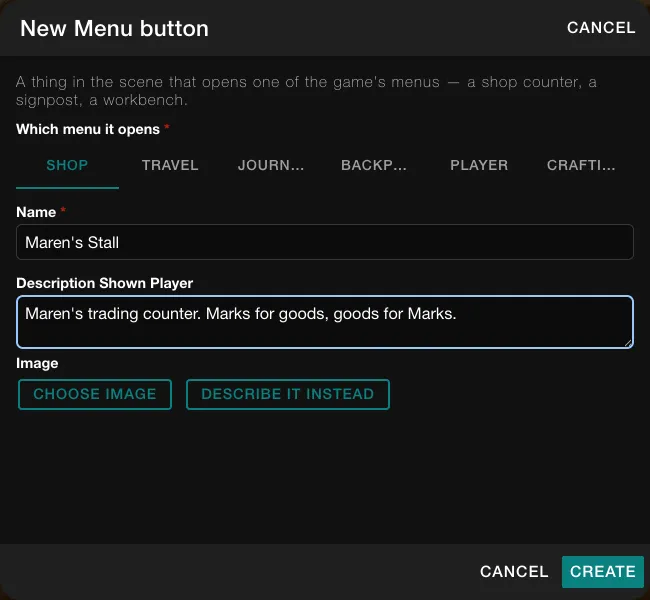
The New Menu button form with SHOP chosen. -
In Add Components, type the button's name in the search box and drag its tile onto open ground in the scene. In the Heads up box, click CONTINUE.
-
Find the shop's panel in Edit Mode's right-hand dock. It is named after the place, here The Last Outpost Shop. Click the arrow on its header to open it. Under "Sold at this Place." a new shop reads "Nothing stocked yet." Vespera's Outpost shop already lists six items, and the number beside the panel's name counts them. There is also a Global Shop panel, which stocks every place.
-
Drag an item from the Add Components palette onto that panel, for example Recipe: Hearth Loaf. Drag with the mouse held down all the way to the panel.
-
If the item has more than one level, a small question asks Which level of the item to stock. Choose one.
-
In the Heads up box, click CONTINUE. The panel now lists the item, with a count badge such as "x1".
-
Edit Mode opens the item's property window on its new Buy. Set the price there: the component to charge, a quantity, and whether it is used up. In Vespera each price is Vesper Marks.
-
On the item's row in the panel, click the ∞ button to make the stock unlimited. Its tip reads "Make stock unlimited", and the count badge disappears. Click it again to set a count.
Good to know
Dropping an item that is already on the shelf adds one to its count. If its stock is unlimited, nothing is written and Edit Mode says it is already there with unlimited stock. An entry at 0 stays in the panel, dimmed with "x0", so you can restock it with ∞ or a count.
Good to know
Undo in the toolbar takes the item off the shelf again. The priced Buy stays on the item, and stocking it again reuses it. Only a Material, Gear, Powerup or Recipe can stand on a shelf. Currency cannot.
Try it
Start a fresh game and go to the place. Tap the Stall. The tabs are Build, Buy and Sell. The Buy tab lists your items with a Buy button and no count. The price shows when the player taps an item. Buying the Recipe in Vespera took 5 Vesper Marks and gave 1 Recipe: Hearth Loaf, and the shelf still offered it afterwards. See Buy.