Component types
Enemy
Every road remembers something that wants to be left alone. An Enemy is the thing in your game that does not leave it alone.
What it is
An Enemy is a hostile thing with stats and moves: a bandit, a wisp, a monster. It can also stand for an illness or a disaster. A fight starts when the enemy is added to the player's inventory, and it ends when no enemy is left there.
There are three ways a fight starts. The player can tap the foe in the scene and choose its Attack. The foe can engage by itself when the player arrives at its place. Or an action can give the foe to the player, for example a shop sale.
Use it for
- A foe that waits in the scene until the player chooses to fight it.
- A foe that jumps the player the moment they arrive.
- A boss with loot of its own.
- An illness or a storm written as a foe the player has to get through.
Actions it can have
| Action | What it does here |
|---|---|
| Attack | The player starts the fight by tapping the foe. Edit Mode offers it as Let the player attack it. |
| Combat move | The foe's own attacks. It picks one at random on its turn and aims it at the player. |
| Enemy defeated | The test for being beaten, and the loot. |
A fourth action, Agro, makes a foe engage by itself on arrival, with conditions if you want them. For a whole fight from start to end, see Combat.
Setting it up
The Create Component dialog has no Enemy choice, so a foe is not made there. In Vespera the Hollow Wisp was made with the MultiBit Agent, and Edit Mode does the rest.
- Select the foe in the scene and open its property window.
- Click Add action ▾ and choose Let the player attack it. Edit Mode offers it only on an Enemy.
- Click Add action ▾ again and choose Give it a fight move, then add its effect with Add target effect. On a foe, Edit Mode edits only that effect.
- Place the foe in the scene. A foe with an Attack and no Agro waits where you place it.
Edit Mode shows the foe's defeat rule and its Agro but does not edit them. See Enemy defeated. Give each foe its own component, because a requirement or loot set on one applies to every copy of it.
In Vespera: the Hollow Wisp Play it
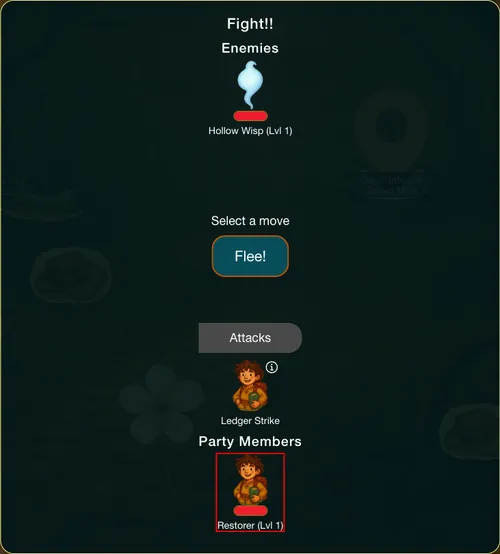
The Hollow Wisp waits on the Hollow Road with 15 Health. It has an Attack that asks the player to have at least 30 Health. It has no Agro, so it does not engage when the player arrives. The player taps it and chooses Attack.
Its move is Chill Touch, which takes 4 Health from the player on each of its turns. The fight log shows it: "Hollow Wisp uses Chill Touch on Apprentice Restorer for -4 health".
When the Wisp is beaten, it gives 3 Vesper Marks (4 for a Trader), 1 Ledger Page, 15 XP and 1 Foes Bested. See Enemy defeated and Tracking. After the win the Wisp is no longer drawn on the Road, and going away and coming back starts no fight.
The Gloam Mine has a second kind of example. Two Rustbiter Goblins wait in it, and each keeps its own Health. One Studded Swing took one goblin from 18 to 6 and left the other at 18. The Gloam Brute is not placed in the Mine at all. Breaking the Sealed Seam gives it to the player, and the fight opens with the Brute at 50 Health. Its Attack asks the player to have at least 50 Health, and it has no Agro. See Combat and Agro.
Good to know
- Foes are fixed. Players cannot drag a foe, and Pickup is never offered on one, because Attack is how a fight starts.
- Each copy has its own Health. Two goblins made from one component are two foes. Hitting one does not hurt the other.
- A bested foe stays bested. It is not drawn again, and arriving at its place never starts a fight with it.
- One fight at a time. The player cannot start a second fight while one is running.
- A foe's moves aim at the player. The player's moves aim at the foe.
Under the hood
- A fight is on while an enemy is in the player's own inventory. Attacking a foe moves it there. A foe that is beaten moves back to the place.
- Attack is refused when the foe is already bested, already in the fight, in another place, or when another foe is already on the player. The last one reads: "Finish the fight you are in first."
- Attack costs and requirements belong to the player, not to the foe. A foe's Attack can ask for a stat or an item from the player.
- A foe can also be given to the player by any action that gives items, such as a shop sale. That starts a fight too.
- Agro makes a foe engage by itself when the player arrives at its place. Its conditions, such as a stat the player must have, decide whether it does. With no Agro and no Attack, a foe engages on arrival.
- A foe with an Attack and no Agro never engages on arrival. Add an Agro to make it engage.