Action types
Combat move
A fight is a short conversation in steel. A combat move is one sentence of it, and the Ledger keeps a record of every one.
What it is
A combat move is an action used inside a fight. The usual move takes some of the Health of whoever it is used on. A character can have moves, a weapon can have moves, and so can a foe.
A move is not what starts the fight. The player starts a fight with a foe in the scene by tapping the foe and choosing Attack. A move is what the player chooses once the fight is on.
What the player sees
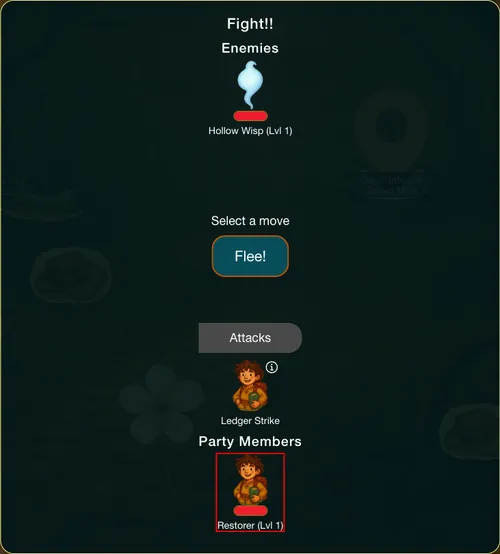
The fight opens in a panel headed "Fight!!". It lists the foe, a "Select a move" prompt with a Flee! button, and the moves the player can use. Moves from the character and from the weapons the player carries are listed together. The player taps a move, then Attack!, and the panel writes one line for each move, the player's and the foe's, such as "Restorer uses Ledger Strike on Hollow Wisp for -6 health".
When the foe's Health reaches 0, the foe is beaten and the panel closes by itself.
Which components can have it
A Character, a Gear item or an Enemy. A foe's moves are its attacks, and they aim at the player.
Requirements & effects it uses
| Requirement / effect | What it does here |
|---|---|
| Takes health | The damage: it wears the target's Health down. A positive change heals instead. |
| Gives when used up | A bonus handed over when the move takes the foe's last Health, such as the club's Scrap Iron. |
| Changes the character's stat | The move changes the character who uses it, for example a heal. |
More exist: a move can cost items or need a tool, a skill or research. They are listed under the hood.
Setting it up
The player's own character is reached from the Add Components panel, and a weapon through its own property window. The full steps, with pictures, are in the guide Give a character an attack. In short:
- Select the character's level or the weapon and open its property window.
- Click Add action and choose Give it a fight move. The new move is named "Strike" and opens ready to edit.
- Rename it, then add its effect with Add target effect, for example Health decreased by 6.
A move with no effect does nothing: the window says "A move does nothing until you add an effect."
In Vespera: Ledger Strike and Studded Swing Play it
Frono has the move Ledger Strike. It takes 6 Health from the foe. It is on his first four levels at 6 and on his fifth level at 10.
The Nail-Studded Club, a weapon Frono can make, has the move Studded Swing. It takes 12 Health from the foe, and when it takes the last Health it also hands over 1 Scrap Iron.
On the Hollow Road, Ledger Strike took the Hollow Wisp down 6 Health a turn, and Studded Swing finished it. Frono's Second Wind move, which restores 15 of his own Health, appears from his third level.
Good to know
- A foe's moves are limited in Edit Mode. On a foe you can edit the effect on the target. Costs and requirements of the foe's moves are edited in the Advanced editor.
- The whole fight. Combat follows a fight from the first foe to the loot.
- A potion is not a move. To let the player drink a tonic mid-fight, give the tonic an Open action instead.
- Moves are offered by level. Only the moves on the character's current level are in the panel.
Under the hood
- A foe's moves are picked at random on the foe's turn, and they aim at the player. The player's moves aim at the foe.
- A move can also cost things from the player's bag, need a tool, a skill or research, and change the player, the weapon or a skill, for example by spending Stamina or adding XP. For a character or a weapon, Edit Mode can edit all of that.
- On a foe, Edit Mode edits the effect on the target only. The foe's own costs and requirements are edited in the Advanced editor or by the assistant.
- A move that hides itself as a draft is left out of the fight panel, the same as any other action marked as a draft.
- Without a defeat action on the foe, a foe at 0 Health still leaves the fight.