Layer types
Image layers
Every scene begins with something to look at. An image layer is a picture hung on the stage for as long as you choose.
What it is
An image layer puts one picture on the stage between a start time and an end time. It has a place, a size and a layer order. It can also be animated: see Animation.
What it can do
- Show a picture for part or all of the story.
- Sit at one of nine anchor points: a corner, an edge or the centre.
- Be sized as a percent of the stage, by width or by height.
- Rest at an offset, a rotation, a scale and an opacity before any animation.
- Sit above or below other layers. A higher layer order is drawn on top.
Adding one
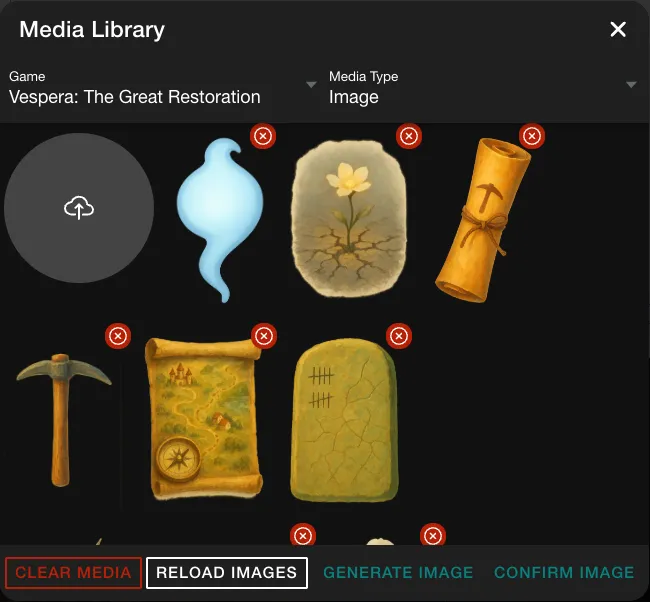
- In the timeline editor, click ADD IMAGE. The Media Library opens, showing the pictures of the game.
- Double-click the picture you want, or click it and then click CONFIRM IMAGE. The library also has CLEAR MEDIA, RELOAD IMAGES and GENERATE IMAGE.
- The new layer is 0 to 5 seconds long. Click its bar in the timeline to open its panel on the right. The INITIAL STATE tab holds the fields below.
Settings
| Field | What it means | Example |
|---|---|---|
| Start Time (ms) | When the layer appears | 8000 |
| End Time (ms) | When it disappears | 20000 |
| Anchor Point | The point the layer is placed from | Center |
| X, Y and their Unit | Offset from the anchor, in percent or pixels | 0 and 0, in % |
| Width (%), Height (%) | Size as a percent of the stage. Set one | Height 100 |
| Max Width (px) | The widest it may be drawn | blank |
| Rotation | Degrees | 0 |
| Opacity | 0 is invisible, 1 is solid | 0 |
| Layer (Z-Index) | Layer order. Higher is on top | 12 |
The tiles in the Media Library carry no names, so you pick a picture by looking at it.
In Vespera: Waystone Memory Play it
Waystone Memory has two image layers, both full height. The withered map runs from 0 to 12 seconds with layer order 11. The restored map runs from 8 to 20 seconds with layer order 12, so it sits on top of the withered one and starts at opacity 0. The two captions have layer orders 13 and 14. They sit above the maps, so the player can read them.
The Intro Story has 20 image layers, each with its own start, end and layer order.
Good to know
- Layer order decides what is on top. A caption must have a higher layer order than the pictures it sits over, or the picture covers it.
- Moving the start past the end. A new layer is 0 to 5 seconds. To start one at 8 seconds, set End Time (ms) first, then Start Time (ms).
- Press SAVE. Changes in the editor are kept only when you click SAVE.
Under the hood
- A text layer and an effect layer share the same fields: start and end, layer order, anchor, resting pose. Only the content differs.
- Set either the width or the height and let the picture's own shape fill in the other. Setting both fights the picture's shape.
- Always set the units of X and Y explicitly. Left unset, an animated layer and a still layer can disagree and the layer shifts.
- A layer with no animation is a still picture. A layer's keyframe times count from its own start, not from the start of the story.