Reference
Map style
A chart wants its own ink. The map style is the ink your pins are drawn in.
What it is
A map style is a small set of choices for how a world map draws its nodes: how big each pin is, how its ring is drawn, what its name label looks like, and what colour the links between pins take. Every map has one.
The style colours the pins and their labels. It does not touch the map picture. The picture is painted art you choose separately.
Settings
| Setting | What it means | New map | Vespera |
|---|---|---|---|
| Node Size | How big each pin is. | 75 | 75 |
| Border Width | How thick the ring round a pin is. | 3 | 3 |
| Border Radius | How round the ring is. A big number such as 50 makes it a circle. | 50 | 50 |
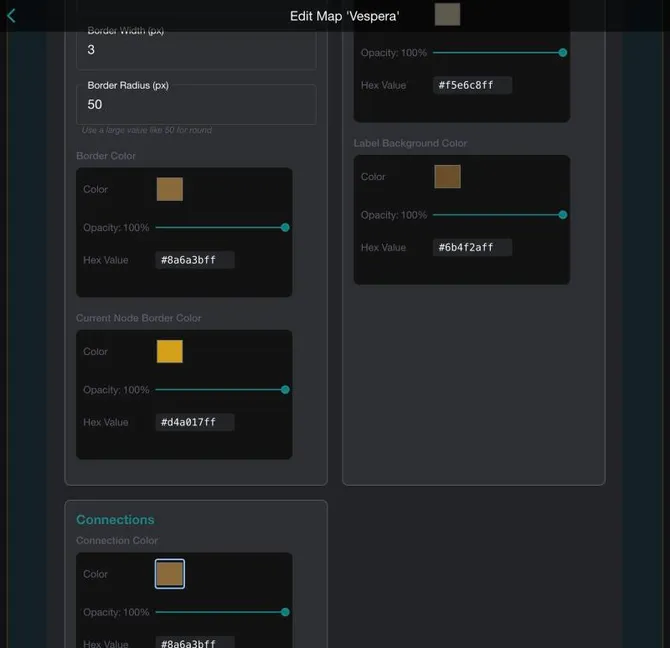
| Border Color | The ring of an ordinary pin. | Set in the panel | #8a6a3b |
| Current Node Border Color | The ring of the pin the player stands on. | Set in the panel | #d4a017 |
| Label Text Color | The colour of a pin's name. | White | #f5e6c8 |
| Label Background Color | The colour behind a pin's name. | #0a8080 | #6b4f2a |
| Connection Color | The colour of a link line between pins. | White | #8a6a3b |
| Connection Thickness | How thick a link line is. | 3 | 3 |
Setting it up
- Open the Edit Map page for your map in the world admin.
- Open the collapsible Edit Map Styles panel. It has three groups: Node Appearance, Node Label and Connections.
- Change a number, or a colour. Each colour has a swatch, an Opacity slider and a Hex Value.
- Click APPLY CHANGES. A message reads "Map saved". Applying the changes saves the map, so you do not need a second save.
In Vespera
In Vespera: parchment colours Play it
The Vespera map is painted in greens, but its pins are drawn in the colours of an old parchment chart: brown rings with gold for the place the player stands on, and cream names on brown labels. The saved colours are #8a6a3bff for the ring, #d4a017ff for the current place, #f5e6c8ff for the label text and #6b4f2aff behind it. The panel saves each colour with eight digits, so the last two, "ff", mean full opacity.
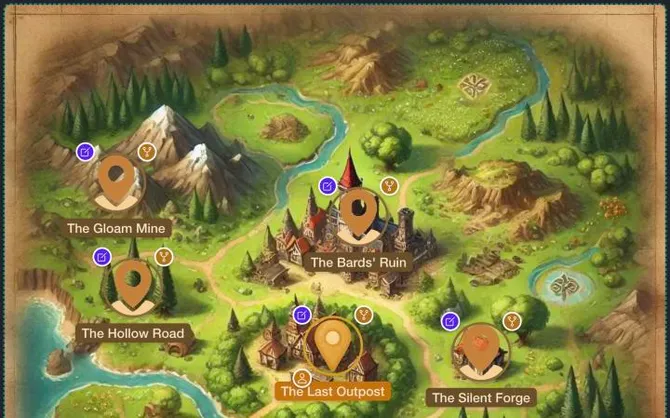
The map has no link lines drawn, so the connection colour has nothing to colour yet. Players travel by signposts.
Good to know
- Colours, not the picture. Do not look here for the map's art. The picture is chosen on the same page, separately.
- A colour has an opacity. The slider sets how see-through it is. 100% is solid.
- The numbers are pixels. Node Size, Border Width and Border Radius are all counted in pixels.
Under the hood
- The style is saved with the map as one block of settings and read back when the map opens.
- The connection colour is kept as one whole number, not as hex text. The Edit Map Styles panel converts it for you.
- A colour that carries an opacity is saved with eight hex digits: six for the colour and two for the opacity.
- The same style is used by the Edit Map page and by the map views in the game.