Requirements & effects
Bonus rewards
A good tool earns its keep. A lucky charm earns a little more. Bonus rewards write the charm into the Ledger.
What it is
Bonus rewards is an effect: an extra reward that an action gives only while the player holds a certain item, or a certain number of it. If the player does not hold it, the action gives its normal rewards and the bonus stays silent.
The item that is checked is never taken. It only has to be there.
Example
Also gives 1 Vesper Marks while the player has at least 1 Pressed Hollow Flower.
Which actions use it
Sell, Craft, Harvest, Make things, Open, Play story, Research, Complete and Destroy. See Harvest, Craft, Open, Make things and Complete.
Settings
| Setting | What it means | Example |
|---|---|---|
| Also gives | The bonus component, with its level if it has more than one. | Vesper Marks |
| Amount | How many are given. | 1 |
| Random max | The top of a random amount. Leave it empty for a fixed amount. | empty |
| Chance | The chance, in percent, that the bonus is given when its condition passes. | 100 |
| While | Where to look: in the player's bag or in this place. The bonus is given in the same place. | in the player's bag |
| Comparison | How the count is compared. The window offers five choices, such as at least. | at least |
| Number | The count to compare against. A whole number, 0 or more. | 1 |
| Condition item | The component that is checked. It can be anything a player can hold, such as a material, a currency, gear, a quest, a recipe, a lore, a collectible or a hidden counter. | Pressed Hollow Flower |
In Edit Mode, the property window shows this under Bonus rewards:
- Click the thing with the action, such as an Ore Vein, then click the blue pencil at its top-left corner. The property window opens.
- Scroll to Bonus rewards in the card of the action, such as Strike. A line says "No bonus rewards." Click Add.
- A row appears: "Also gives" with a component box, an amount and a chance, and under it "while" with three boxes and a component box. Click the first component box, type part of the name, such as Vesper, and pick Vesper Marks. The amount stays 1 and the chance stays 100.
- Click the condition component box, type part of the name, such as Pressed, and pick Pressed Hollow Flower. The boxes before it say "in the player's bag", "has", "at least" and 1. Leave them.
- A line reads the row back: "Also gives 1 Vesper Marks while the player has at least 1 Pressed Hollow Flower." Under it a note reads "The check and the bonus use the same place."
- Click the action's Save. The Heads up dialog warns that saving refreshes your current game. Click Continue. A toast reads "Saved "Strike"."
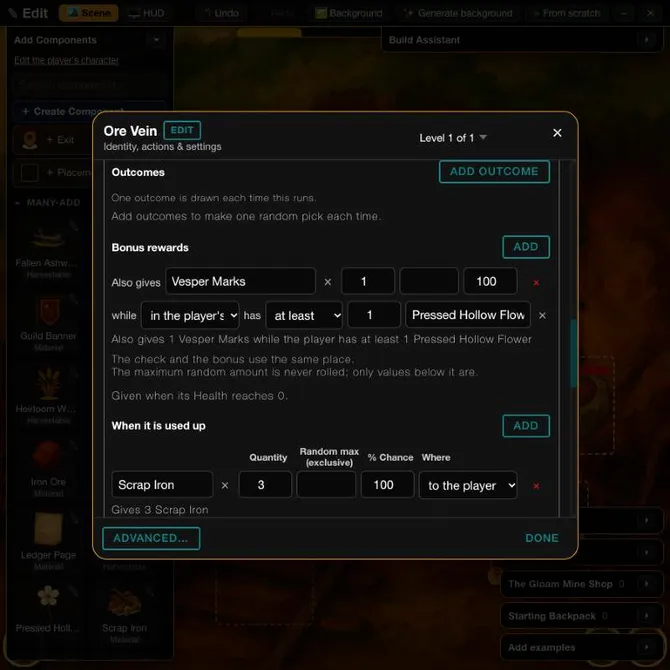
In Vespera: the Ore Vein and the Pressed Hollow Flower Play it
The Ore Vein in the Gloam Mine has an action called Strike. A strike gives 2 Iron Ore. It also carries a bonus: 1 Vesper Marks while the player has at least 1 Pressed Hollow Flower. The Flower lies on the Hollow Road, and the player can pick it up.
In play, Frono struck the vein three times while he carried the Flower. Each strike floated "+2 Iron Ore" and "+1 Vesper Marks". His Iron Ore went from 4 to 10 and his Marks from 29 to 32. The Flower is never used up by the check.
Good to know
- The window refuses some numbers. On save it refuses a number that is not a whole number of 0 or more ("The number to compare with must be a whole number, 0 or more."), "fewer than 0", and a random max that is not above the amount.
- One place for both jobs. The place where the item is checked is also where the bonus lands. A bonus checked in this place is given in this place.
- A unique item is yes or no. For an item that exists once, the window offers only "has one" and "has none".
- The bonus is not the normal reward. Use Gives for what every run gives.
Under the hood
- The game counts every live stack of the condition item in the chosen place, added together. Stacks at different spots all count, and a copy that is still under construction does not.
- Only the exact level of the condition item counts. A higher level of the same item does not satisfy it.
- The condition item is never used up, even if it were marked as used up.
- A unique item is one stack per copy, so two copies count 2, but the window offers only has one or has none for it.
- A stored comparison the window has no word for, a condition item it cannot show whole, or a grouped bonus stays as a read-only line and is not changed by a save.
- A bonus is not offered on Buy, Build, Upgrade, Learn, Travel, Enemy defeated or the event actions.